AI 摘要
最近看到某论坛上有关闲鱼获取详细的帖子,便有了写个脚本的想法
闲鱼h5的研究
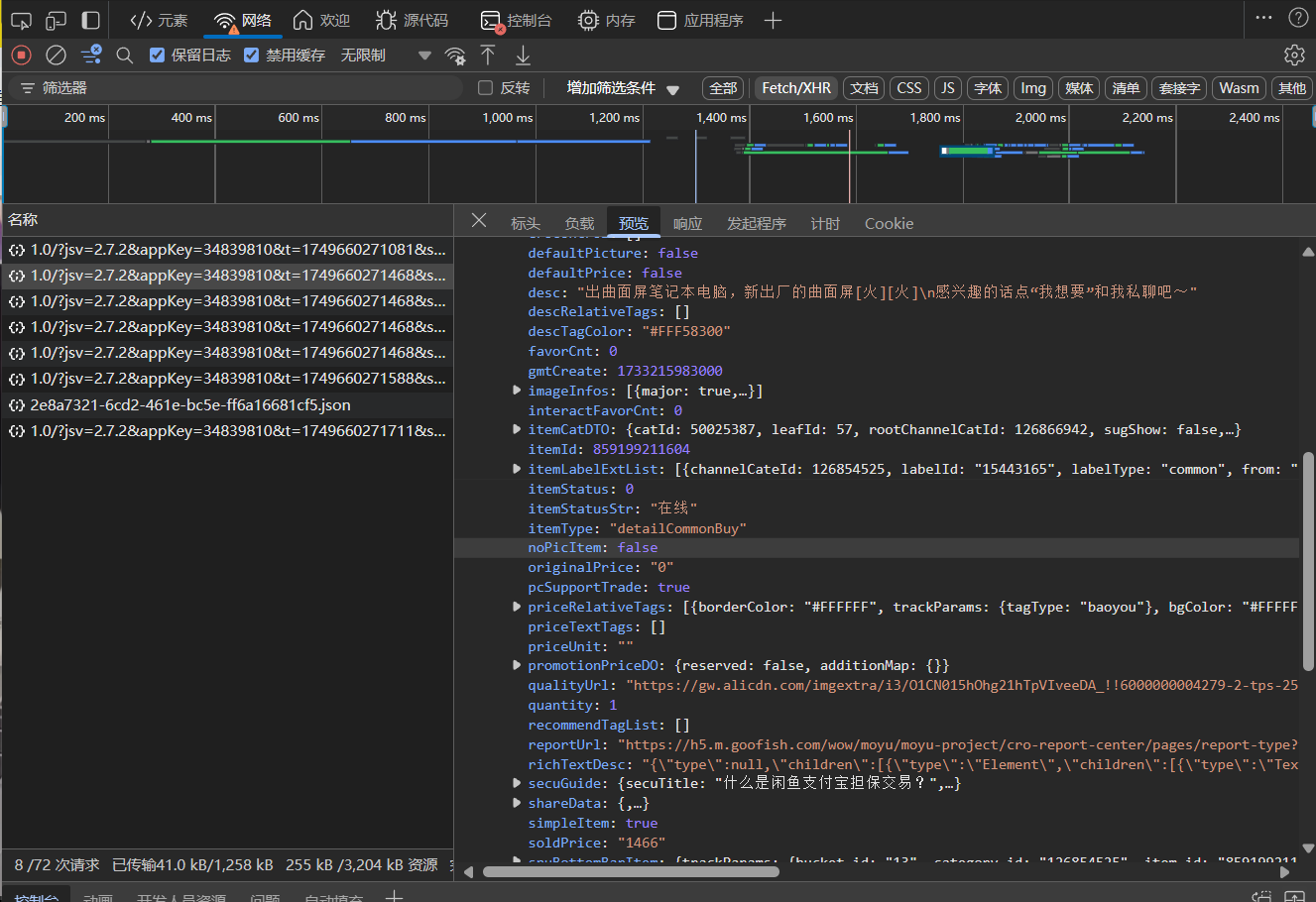
可以看到咸鱼的这个这个接口便是对应的数据
url: https://h5api.m.goofish.com/h5/mtop.taobao.idle.pc.detail/1.0/
param: jsv=2.7.2&appKey=34839810&t=1749660271468&sign=d99215598a87fc030a45a608269f6906&v=1.0&type=originaljson&accountSite=xianyu&dataType=json&timeout=20000&api=mtop.taobao.idle.pc.detail&sessionOption=AutoLoginOnly&spm_cnt=a21ybx.item.0.0
data: {"itemId":"859199211604"}
cookie: ..._m_h5_tk=xxx; _m_h5_tk_enc=xxx
经过我多次尝试,只有t,sign,_m_h5_tk,_m_h5_tk_enc是变化的,现在目标就很明确了
编码实现
t为13位时间戳,而经过查阅资料可以分析出,token: _m_h5_tk sign:token&t&appKey&data,然后取MD5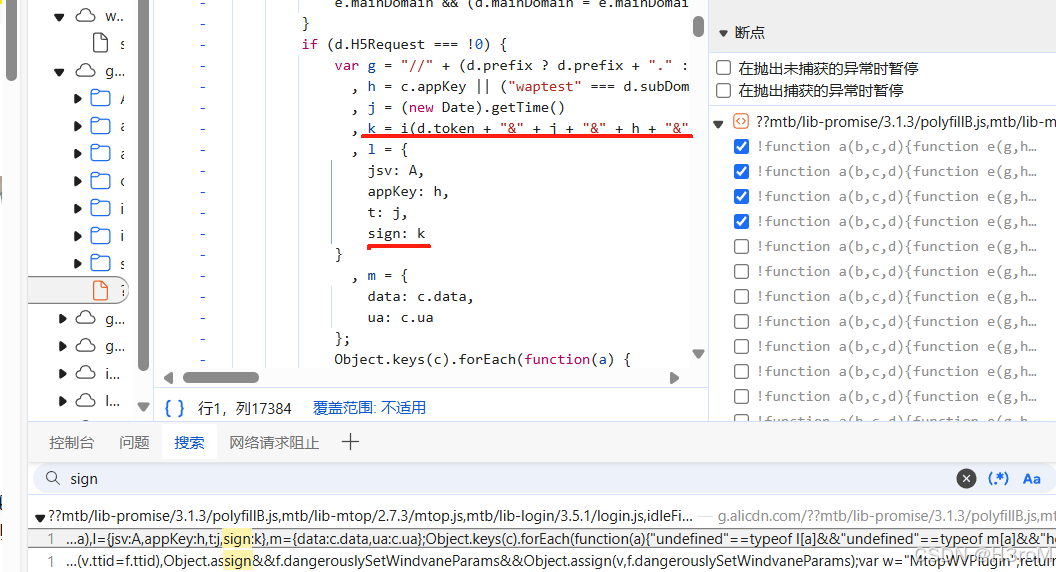
_m_h5_tk会有过期时间,通过开发者工具,这个地址https://h5api.m.goofish.com/h5/mtop.gaia.nodejs.gaia.idle.data.gw.v2.index.get/1.0/在首次访问时候,在header里面的set-cookie能找到_m_h5_tk,_m_h5_tk_enc,而首次访问所携带的token必为空,也就是说,计算sign只需要t和data即可
代码实现
def _get_m_h5_tk(self) -> list:
        """获取API认证所需的_m_h5_tk令牌"""

        # 构建一个简单的请求数据和参数
        data = '{"piUrl":"https://h5.m.goofish.com/wow/moyu/moyu-project/xy-site/pages/announcement"}'
        # 生成时间戳
        t = str(round(time.time() * 1000))

        token = ""
        appKey = "34839810"
        # token + & + t + & + appKey + & + data_str
        sign_string = f"{token}&{t}&{appKey}&{data}"
        sign = md5(sign_string.encode()).hexdigest()
        params = {
            'jsv': "2.7.2",
            'appKey': "34839810",
            "t": t,
            "sign": sign,
            'api': 'mtop.gaia.nodejs.gaia.idle.data.gw.v2.index.get',
            'v': '1.0',
            "type": "originaljson",
            "accountSite": "xianyu",
            "dataType": "json",
            "timeout": "20000",
            "sessionOption": "AutoLoginOnly",
            "spm_cnt": "a21ybx.item.0.0",
        }
        # API请求地址
        api = 'https://h5api.m.goofish.com/h5/mtop.gaia.nodejs.gaia.idle.data.gw.v2.index.get/1.0/'

        response = requests.get(api, params=params)

        # 从响应cookies中提取_m_h5_tk
        cookies = response.cookies
        _m_h5_tk = cookies.get('_m_h5_tk', '')
        _m_h5_tk_enc = cookies.get('_m_h5_tk_enc', '')

        return [_m_h5_tk, _m_h5_tk_enc]
['08c31977d09c9c8c610114029b8e17a5_1749669468863', 'b8d02be3c6b0ee2a0f5a21d8c7023b93']对应的获取商品详细也能写出来了
def get_info(self, url: str):
        """ 获取闲鱼商品信息 """
        itemId = self._get_itemId(url)
        if itemId is None:
            logging.error("获取商品ID失败")
            return None

        cookies = self._update_tokens()

        # 准备参数
        appKey = "34839810"
        api = "mtop.taobao.idle.pc.detail"
        v = "1.0"
        data_str = f'{{"itemId":"{itemId}"}}'

        # 生成时间戳
        t = str(round(time.time() * 1000))

        # 从 _m_h5_tk 中提取 token
        token = cookies['_m_h5_tk'].split('_')[0]

        # token + & + t + & + appKey + & + data_str
        sign_string = f"{token}&{t}&{appKey}&{data_str}"
        sign = md5(sign_string.encode()).hexdigest()

        # URL 参数
        params = {
            "jsv": "2.7.2",
            "appKey": appKey,
            "t": t,
            "sign": sign,
            "v": v,
            "type": "originaljson",
            "accountSite": "xianyu",
            "dataType": "json",
            "timeout": "20000",
            "api": api,
            "sessionOption": "AutoLoginOnly",
            "spm_cnt": "a21ybx.item.0.0",
            # "spm_pre": "a21ybx.item.itemCnxh.2.165c3da6uwAGTv",
        }

        query = '&'.join([f"{k}={quote(str(v))}" for k, v in params.items()])
        url = f"https://h5api.m.goofish.com/h5/{api}/{v}/?{query}"

        headers = {
            "Host": "h5api.m.goofish.com",
            "Connection": "keep-alive",
            "sec-ch-ua-platform": '"Windows"',
            "User-Agent": "Mozilla/5.0 (Windows NT 10.0; Win64; x64) AppleWebKit/537.36 (KHTML, like Gecko) Chrome/136.0.0.0 Safari/537.36 Edg/136.0.0.0",
            "Accept": "application/json",
            "sec-ch-ua": 'Chromium";v="136", "Microsoft Edge";v="136", "Not.A/Brand";v="99',
            "Content-type": "application/x-www-form-urlencoded",
            "sec-ch-ua-mobile": "?0",
            "Origin": "https://www.goofish.com",
            "Sec-Fetch-Site": "same-site",
            "Sec-Fetch-Mode": "cors",
            "Sec-Fetch-Dest": "empty",
            "Referer": "https://www.goofish.com/",
            "Cookie": self.xyCookie.strip()
        }

        data = f"data={quote(data_str)}"

        res = requests.post(url, headers=headers, data=data)
        res.encoding = "utf-8"
        if res.status_code != 200:
            logging.error("获取商品信息失败")
            return None
        data = self._format_item_info(res.json())
        return data
{'itemId': 859199211604, 'title': '出曲面屏笔记本电脑,新出厂的曲面屏[火][火]', 'desc': '出曲面屏笔记本电脑,新出厂的曲面屏[火][火]\n感兴趣的话点“我想要”和我私聊吧~', 'soldPrice':
'1466', 'originalPrice': '0', 'transportFee': '0.00', 'image_urls': ['http://img.alicdn.com/bao/uploaded/i3/O1CN01uw42JI2Az5fSKioAd_!!4611686018427383553-0-fleamarket.jpg'], 'tags': [
'包邮'], 'browseCnt': 32499, 'wantCnt': 63, 'gmtCreate': 1733215983000}注意,此方法已经被我的其他方法封装过了,如self._get_itemId即获取商品id,self._format_item_info即格式化最后的json,因为数据过多,只保留我需要的即可
如无特殊说明 《闲鱼详情页json》 为博主LIN 原创,转载请注明原文链接为:https://blog.lin03.cn/archives/30/